In reinforced concrete structures, rebar (reinforcing steel) plays a critical role in enhancing load-bearing capacity, enabling structures to resist bending and tensile forces while ensuring long-term durability. However, behind what may appear to be simple drawings lies a complex design and implementation process that requires high precision in bar placement, connections, and clash control between structural elements.
With the advancement of BIM and 3D design tools, rebar detailing is increasingly being digitized and automated. This allows engineers to better control geometry, quantities, and accuracy right from the design stage. This article will help you gain a clearer understanding of rebar, its role in concrete structures, and the growing trend of applying technology in modern rebar design and detailing.

Tekkin is a term used to refer to steel bars placed within concrete structures to enhance their load-bearing capacity. When combined with concrete, the reinforcement system helps the structure better resist bending and tensile forces. Typically, deformed bars are widely used, with common diameters such as D4, D5, D6, D10, D13, D16, D19, D22, D25, D29, D32, D35, D38, D41, and D51 (for example, D19 corresponds to a diameter of approximately 19 mm).

A 3D rebar model with color-coded bar diameters
Some 3D CAD software includes rebar placement functions, allowing users to effectively check and resolve three-dimensional clashes that cannot be detected in 2D drawings.
One key feature is the linking function, where changes made to the model—such as adjustments to rebar diameter or spacing—are automatically reflected in summary schedules in real time.
Furthermore, detecting clashes in densely reinforced areas during the design stage helps prevent rework during construction and supports the development of construction methods before execution begins.
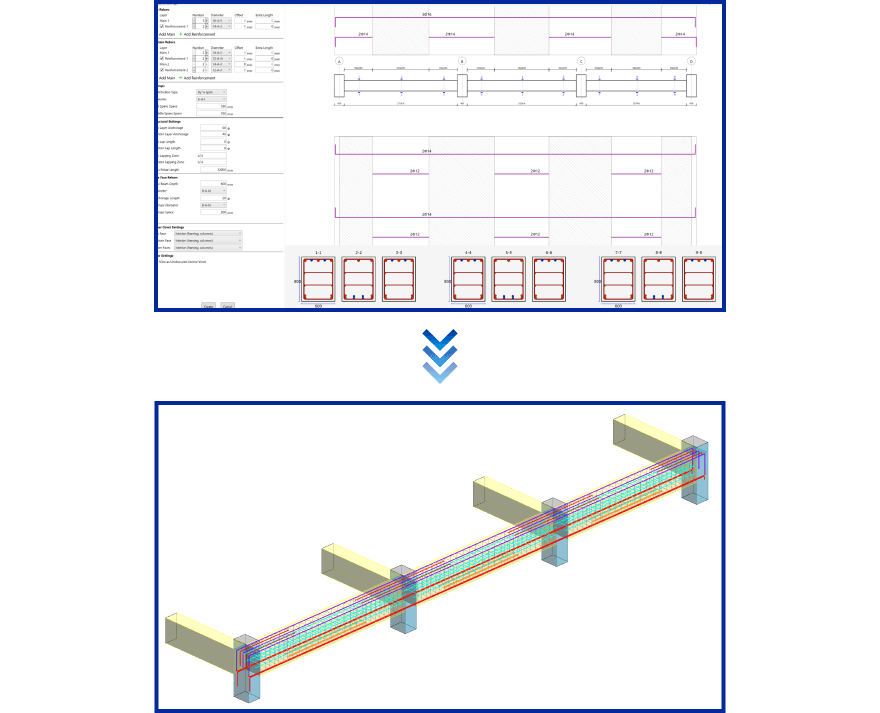
Image generated using BrightBIM
Autodesk Revit or BrightBIM allows you to create 3D models of structural elements and rebar in civil construction projects, as well as perform quantity takeoffs.
Software | Country / Developer | Advantages | Limitations |
|---|---|---|---|
BrightBIM | Vietnam / TGL Solutions | - Specialized for 3D rebar detailing (beams, columns, slabs, foundations) - Strong automation: rule-based rebar generation (diameter, spacing, cover…) - Optimized for fast shop drawing production, reducing manual work - Automatically updates when design changes - Fast and consistent export of shop drawings & BBS with fewer errors - Supports project-based rebar data standardization - Strong integration within ecosystem (VinaCAD, VinaCDE, TakaCAD, etc.) - Low cost | - Not widely adopted internationally - Dependent on Revit environment - Does not fully handle architecture/MEP/IFC workflows - Requires basic BIM knowledge |
Autodesk Revit | USA / Autodesk | - Powerful all-in-one BIM platform (Architecture, Structure, MEP) - Supports 3D rebar modeling in concrete structures - Real-time link between model and schedules - Enables clash detection in BIM environment - Supports full building lifecycle management - Strong ecosystem (Navisworks, Civil 3D, InfraWorks…) | - Rebar features not specialized for shop drawing detailing - Time-consuming for complex rebar modeling - Lower automation compared to dedicated rebar tools - Heavily dependent on families/templates - Performance drops with dense rebar models - High cost |
Autodesk Revit is a comprehensive BIM platform widely used in the construction industry to model and manage the entire building, including architecture, structure, and MEP systems. The software also supports 3D rebar modeling and enables data linkage between the model and schedules, helping ensure consistent control of design information.
However, despite its rebar capabilities, Revit is primarily focused on overall BIM workflows and is not deeply optimized for detailed rebar shop drawing production. In complex projects, users often need to integrate additional specialized tools to improve efficiency and reduce processing time.

BrightBIM is an add-in for Autodesk Revit that supports rebar placement in reinforced concrete elements, helping optimize both design and construction workflows while significantly reducing time and errors compared to manual methods.
Key capabilities:

Sign up for a BrightBIM trial today
Rebar is an indispensable component in reinforced concrete structures, playing a critical role in enhancing load-bearing capacity and ensuring the durability and safety of a project. Accurate rebar placement and detailing directly impact construction quality as well as the long-term performance of the structure.
In the context of the growing adoption of BIM, rebar design and detailing have been rapidly digitized, improving accuracy, reducing errors, and optimizing execution time. This highlights that rebar is not only a structural element but also an essential part of the digital transformation in the modern construction industry.
Are you facing challenges in implementing BIM, Revit, CDE, or any technology and technical aspects related to BIM for your project?
Don’t worry — BIMCAD Vietnam is always ready to support you!