In many BIM projects today, rebar detailing in Revit remains one of the most time-consuming tasks.
While 3D modeling provides better visualization and control compared to traditional 2D workflows, the actual process is still far from optimized. Engineers often have to model each rebar manually, repeat the same steps for similar structural elements, and deal with a high risk of errors throughout the process. As project scale increases, these challenges not only impact timelines but also affect the overall quality of the BIM model.
This raises an important question: is there a way to fully automate rebar placement in Revit?
This is exactly why BIM automation tools have emerged. Among them, BrightBIM stands out as a powerful solution that enables automated rebar placement based on predefined rules and input parameters—significantly reducing modeling time while minimizing errors and improving overall efficiency.

BrightBIM is a BIM automation tool developed to optimize the rebar detailing workflow in the Revit environment. BrightBIM is an add-in for Revit that supports rebar placement in reinforced concrete elements. It helps optimize the design and detailing process, significantly reducing time and errors compared to manual workflows.
The tool is designed to address common challenges in rebar detailing, such as time-consuming processes, repetitive tasks, and a high risk of errors. With BrightBIM, users can quickly apply rebar configurations to various structural elements—such as beams, columns, and slabs—in just a few setup steps.
Beyond automation, BrightBIM also ensures consistency and standardization across the entire project. Rebar placement rules are centrally managed, allowing engineers to work more consistently while making it easier to review and adjust when design changes occur.
As a result, BrightBIM not only accelerates the detailing process but also improves the overall quality of the BIM model, reduces rework, and enhances coordination efficiency across disciplines within the project.

In the process of BIM implementation—especially in large-scale projects—many companies are still dealing with familiar bottlenecks:
Time-Consuming, Repetitive Tasks
Tasks such as naming, assigning parameters, standardizing templates, and exporting data are still performed manually for each project. This causes engineers to spend significant time on low-value, repetitive work.
Inconsistent Data
Information within the model is often: Missing parameters, Incorrect naming conventions, Not aligned with common standards. This leads to frequent rework, impacting both project timelines and data quality.
Unreliable Reports & Quantities
Even when BOQs are generated from the model, teams often still need to: Manually adjust data, Recheck multiple times. This increases the risk of errors, especially in large and complex projects.
Dependency on Individuals
Workflows often rely heavily on “key users”: Experienced individuals play a critical role, When personnel change → workflows can be disrupted. This makes it difficult to build a stable and scalable operating system.
Limited Scalability
As projects or organizations grow: Different teams apply different workflows, Lack of unified standards. This creates challenges in maintaining quality control and ensuring consistent data across the entire project.

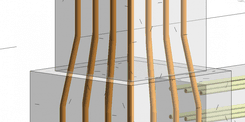
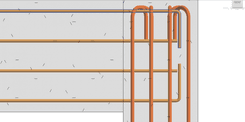
BrightBIM applies a rule-based and automation-driven approach to streamline rebar detailing in Revit. The tool can automatically recognize structural elements such as beams, columns, and slabs within the model, significantly reducing the need for manual selection.
1. Automatic Object Recognition
BrightBIM automatically identifies structural elements such as beams, columns, and slabs within the model, significantly reducing the need for manual selection and streamlining the workflow.
2. Smart Parameter Input
BrightBIM allows users to input key parameters such as rebar diameter, concrete cover, spacing, and standard-based placement rules, enabling a more intelligent and controlled rebar configuration process.
3. Automated Rebar Generation
BrightBIM can generate rebar for structural elements in just a few seconds, while also allowing the same configurations to be applied simultaneously across multiple elements, ensuring both speed and consistency in the modeling process.
4. Validation & Adjustment
BrightBIM helps detect logical errors in rebar placement and provides warnings for potential issues, enabling engineers to quickly review and make necessary adjustments. As a result, tasks that once took hours can now be completed in just minutes.

1.Full Automation of the Rebar Workflow
BrightBIM enables full automation of the rebar workflow—from element recognition to placement and validation—helping reduce repetitive tasks by up to 80% and significantly improving overall efficiency.
2.Standardized According to Project Standards
The tool supports project-based standardization by allowing teams to apply unified rules across all models, ensuring consistency and alignment among different modelers.
3.Model Quality Control
It also enhances model quality control by detecting errors before drawing issuance, increasing the reliability and accuracy of BIM data throughout the project lifecycle.
4.Quantity Takeoff Support
BrightBIM supports quantity takeoff by allowing users to generate schedules directly from Revit, helping QS teams and estimators work faster and more efficiently.

1.Multiply Productivity
BrightBIM significantly boosts productivity by reducing rebar modeling time and allowing engineers to focus on higher-value tasks, ultimately optimizing resource utilization.
2.Reduce Errors
It also minimizes errors by reducing manual input, ensuring more consistent and controlled data across the model.
3.Enhance Collaboration
Enhances collaboration by making it easier to review models within a BIM/CDE environment and supporting more effective clash detection.
4.Optimize Project Costs
it helps optimize project costs by reducing rework and improving material control throughout the project lifecycle.

BrightBIM is well-suited for structural design consulting firms, BIM contractors, and projects with large volumes of rebar such as high-rise buildings and infrastructure developments. It is also an ideal solution for companies transitioning from CAD to BIM, helping them standardize workflows and improve efficiency during the digital transformation process.
BrightBIM does more than just speed up rebar detailing—it fundamentally transforms how BIM teams work. By shifting from manual processes to automation, from fragmented workflows to standardized systems, and from error-prone modeling to controlled, data-driven execution, it creates a more efficient and reliable working environment. BrightBIM becomes a key enabler for organizations to elevate their BIM capabilities, standardize workflows, and strengthen their competitiveness in an increasingly demanding construction market.
Are you facing challenges in implementing BIM, Revit, CDE, or any technology and technical aspects related to BIM for your project?
Don’t worry — BIMCAD Vietnam is always ready to support you!